Hostinger vs WordPress.com vs Wix: Which Is Best?
Choosing between Hostinger, WordPress.com, and Wix is confusing because they solve overlapping but different problems.
Wix is mainly an all-in-one website builder. WordPress.com is a managed WordPress publishing and website platform. Hostinger is a hosting company that offers shared hosting, WordPress hosting, a website builder, AI website tools, domains, and related services.
So the question is not simply, “Which platform is best?”
The better question is: What kind of website are you building, and how much control do you need?
A restaurant, salon, real estate agent, blogger, consultant, online store, agency, and SaaS startup should not all choose the same platform automatically.
Quick Verdict
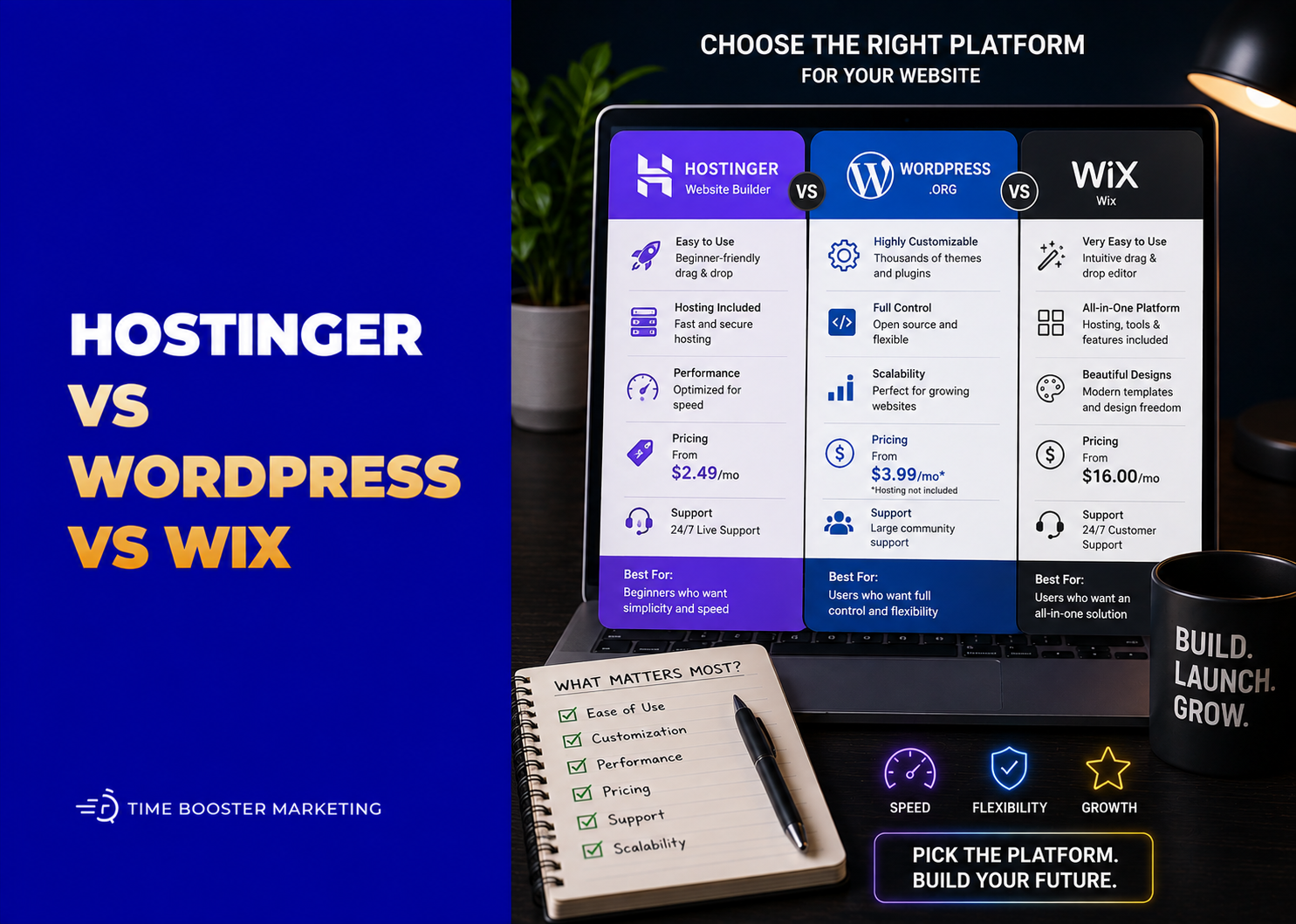
Choose Hostinger if you want affordable hosting, WordPress flexibility, a simple AI website builder, or a budget-friendly website setup.
Choose WordPress.com if blogging, publishing, SEO content, newsletters, long-term articles, and WordPress-style site management are central to your strategy.
Choose Wix if you want a polished all-in-one website builder with design flexibility, business features, booking tools, e-commerce options, and less technical setup.
What Hostinger Is Best For

Hostinger is strongest when you want affordable hosting and flexibility. You can use Hostinger to host WordPress, build a site with its website builder, buy domains, set up email, and manage hosting from one account.
Hostinger’s Website Builder includes a drag-and-drop editor, more than 300 templates, AI-assisted site creation, a free domain on eligible plans, and built-in marketing tools. Hostinger also says its builder automatically generates sitemaps, which helps beginners avoid one common SEO setup mistake.
This makes Hostinger attractive for small businesses that want to launch quickly without paying premium builder prices.
Hostinger is a good fit for:
- small business websites
- portfolios
- service pages
- simple online stores
- WordPress websites
- landing pages
- blogs hosted on WordPress
- entrepreneurs watching costs closely
The main limitation is choice complexity. Hostinger can mean “use its website builder” or “use Hostinger hosting with WordPress.” Those are different workflows. Beginners should decide whether they want a drag-and-drop builder or a WordPress site before buying.
What WordPress.com Is Best For
WordPress.com is best for people who want managed WordPress without setting up hosting manually.
It is especially strong for blogging, content marketing, publishing, newsletters, resource libraries, and sites that need regular articles. WordPress.com’s plan guide describes the platform as including managed hosting, editing tools, plugins, and audience growth features depending on the plan.
WordPress.com is a good fit for:
- bloggers
- writers
- media brands
- educators
- consultants
- SEO content sites
- thought leadership websites
- businesses publishing many articles
WordPress.com also now includes AI-assisted website creation. Its AI Website Builder can generate a full site draft from a prompt, including layout, suggested images, and content sections.
The limitation is that WordPress.com’s flexibility depends on the plan. Some advanced customization, plugin, commerce, and developer-level options may require higher-tier plans. Entrepreneurs should check the current WordPress.com pricing page before choosing.
What Wix Is Best For

Wix is best for entrepreneurs who want an all-in-one website builder with strong visual control and built-in business tools.
Wix works well for service businesses, portfolios, restaurants, salons, coaches, consultants, creators, small online stores, booking-based businesses, and local brands that want a professional site without managing hosting or WordPress updates.
Wix’s AI Website Builder lets users describe their website through a conversational interface and generate a business-ready site. Wix also emphasizes managed infrastructure, security, hosting, performance, and support as part of the builder experience.
Wix is a good fit for:
- service businesses
- consultants
- coaches
- restaurants
- salons
- portfolios
- event brands
- simple e-commerce
- appointment-based businesses
- small teams that want easy editing
Wix’s pricing page explains that premium plans allow users to connect a custom domain, remove Wix branding, and access more site and business features depending on the plan.
The limitation is platform lock-in. If you later want deep server control, custom backend development, or full WordPress portability, Wix may feel restrictive.
Ease of Use
Wix is usually the easiest for visual editing. You can build pages, move sections, add business features, and manage your site without thinking about hosting.
Hostinger Website Builder is also beginner-friendly, especially if you want a fast AI-assisted site and affordable hosting bundle.
WordPress.com is easy for writing and publishing, but it may feel less visually simple than Wix for users who want full design freedom immediately.
For a beginner who wants a clean website fast, Wix or Hostinger Website Builder may feel easier. For a beginner who wants to publish articles every week, WordPress.com may feel more natural.
SEO Comparison
All three platforms can support SEO, but they serve different SEO strategies.
Hostinger Website Builder includes basic SEO support, automatic sitemap generation, and SEO settings. Its help documentation says website speed and sitemaps are handled by default in the builder, while users can edit SEO settings for pages.
WordPress.com is strong for content SEO because WordPress is built around publishing. It is useful for blogs, topic clusters, guides, and educational articles.
Wix has improved significantly for SEO and provides built-in SEO tools, structured site setup, editable page settings, and marketing integrations.
The real SEO winner depends less on the platform and more on execution. A clear, fast, helpful website with strong service pages, internal links, optimized titles, useful content, and good mobile experience will outperform a weak site on a “better” platform.
Blogging and Content Marketing
WordPress.com is the strongest option if blogging is central to your business.
If you plan to publish articles, guides, tutorials, news, reviews, and educational content every week, WordPress.com gives you a publishing-first environment.
Hostinger can also be excellent for blogging if you use WordPress hosting. In that case, you are using WordPress as your content system but paying Hostinger for hosting.
Wix can handle blogs, but it is usually better for business websites where blogging supports a service, product, or brand rather than acting as the main publishing engine.
E-Commerce and Online Selling
Wix is strong for small-business e-commerce because it combines site design, product pages, checkout tools, marketing, and business features in one builder.
Hostinger Website Builder can support simple online stores, but more complex e-commerce may be better handled through WordPress with WooCommerce on Hostinger hosting.
WordPress.com can support commerce depending on the plan, but users should review current plan limits before committing.
For a boutique, creator shop, restaurant product offer, or small catalog, Wix or Hostinger may be enough. For a content-heavy store, WordPress may be better. For a serious e-commerce business with complex inventory, payments, integrations, and scaling needs, compare specialist platforms too.
Customization and Control
Hostinger with WordPress gives the most control among these options if you are comfortable managing WordPress themes, plugins, hosting settings, backups, and technical decisions.
WordPress.com gives WordPress power in a managed environment, but some flexibility depends on the plan.
Wix gives strong design freedom inside its own ecosystem, but less technical portability.
Hostinger Website Builder gives simplicity, but it is not the same as managing a full open WordPress environment.
So the control ranking is usually:
Most control: Hostinger with WordPress
Balanced managed publishing: WordPress.com
Most visual all-in-one simplicity: Wix
Simplest budget builder: Hostinger Website Builder
Pricing and Long-Term Cost
Hostinger often attracts budget-conscious entrepreneurs because its entry-level plans are competitively priced, especially for longer billing periods. But users should check renewal pricing, plan limits, storage, email, backups, and whether they are buying hosting, website builder access, or WordPress hosting.
WordPress.com has a free plan, but serious business use usually needs a paid plan for custom domains, fewer restrictions, advanced features, plugins, commerce, and professional growth. WordPress.com states that the free plan uses a WordPress.com subdomain and does not include a custom domain.
Wix also offers free testing, but business use typically requires a premium plan to connect a domain and remove Wix branding.
Do not compare only the first-month price. Compare renewal cost, domain, email, storage, e-commerce, support, plugins, apps, payment features, and future redesign needs.
Best Platform by Business Type
Choose Hostinger Website Builder if you need an affordable website for a small business, portfolio, landing page, or simple online presence.
Choose Hostinger WordPress Hosting if you want WordPress flexibility, lower hosting costs, more control, and room to scale content or custom features.
Choose WordPress.com if your website depends heavily on blogging, publishing, thought leadership, education, or SEO content.
Choose Wix if you want a professional business website with visual editing, booking, service pages, marketing features, and simple e-commerce in one place.
Decision Framework
Ask yourself five questions.
1. Do You Want to Write Regular Blog Content?
Choose WordPress.com or Hostinger with WordPress.
2. Do You Want the Easiest Visual Editing Experience?
Choose Wix or Hostinger Website Builder.
3. Do You Need Maximum Control?
Choose Hostinger with WordPress.
4. Do You Want the Least Technical Setup?
Choose Wix, WordPress.com, or Hostinger Website Builder.
5. Are You Building a Serious Long-Term Content Asset?
Choose WordPress.com or Hostinger with WordPress.
Final Verdict
Hostinger is best for affordability, hosting flexibility, WordPress control, and simple AI-assisted websites.
WordPress.com is best for publishing, blogging, content marketing, and managed WordPress growth.
Wix is best for entrepreneurs who want a polished, all-in-one business website builder with strong design control and practical business features.
For many small businesses, Wix is the easiest all-round choice. For bloggers and SEO-driven businesses, WordPress.com or Hostinger with WordPress is stronger. For budget-conscious entrepreneurs who want hosting control, Hostinger is hard to ignore.
The best platform is the one that matches your business model, not the one with the loudest marketing. Choose based on how you will actually use the website: publish, sell, book, educate, rank, showcase, or generate leads.