
As a business owner in Cameroon, you work hard to make your website look great and provide valuable information. But have you ever paid attention to the web address at the top of the browser for each page? That link, known as a URL, is more than just a technical address; it’s a powerful tool for your website’s success. The way you handle structuring URLs has a direct impact on how easily customers can find you on Google. It’s one of the foundational pieces of good SEO, yet it’s an area where many businesses make simple, avoidable mistakes.
Think of your URL as the sign above your shop’s door. A good sign is short, clear, and tells people exactly what you sell. A bad sign is long, confusing, and filled with random numbers and symbols. Which shop would you be more likely to enter? Search engines and human users think the same way about your URLs. This guide will walk you through the simple rules for creating clean, descriptive, and powerful URLs that will help you rank higher and build a more professional online presence in the Cameroonian market.
What is a URL and How Does it Connect to SEO?
A URL (Uniform Resource Locator) is simply the unique web address for any given page on the internet. It’s what you type into your browser to go to a website. For example, the URL for this page is likely something like yourwebsite.com/blog/structuring-urls-for-seo.
Every part of that URL sends a signal. It tells both users and search engines what the page is about before they even get there. Google has confirmed that having a well-structured URL is a small but real ranking factor.
For Cameroonian businesses, a clear URL is even more important. It helps build trust, looks more professional when shared on social media or WhatsApp, and is easier for people to remember and type, especially on mobile devices. A clean URL is a sign of a well-organized, credible business.
The Anatomy of a URL
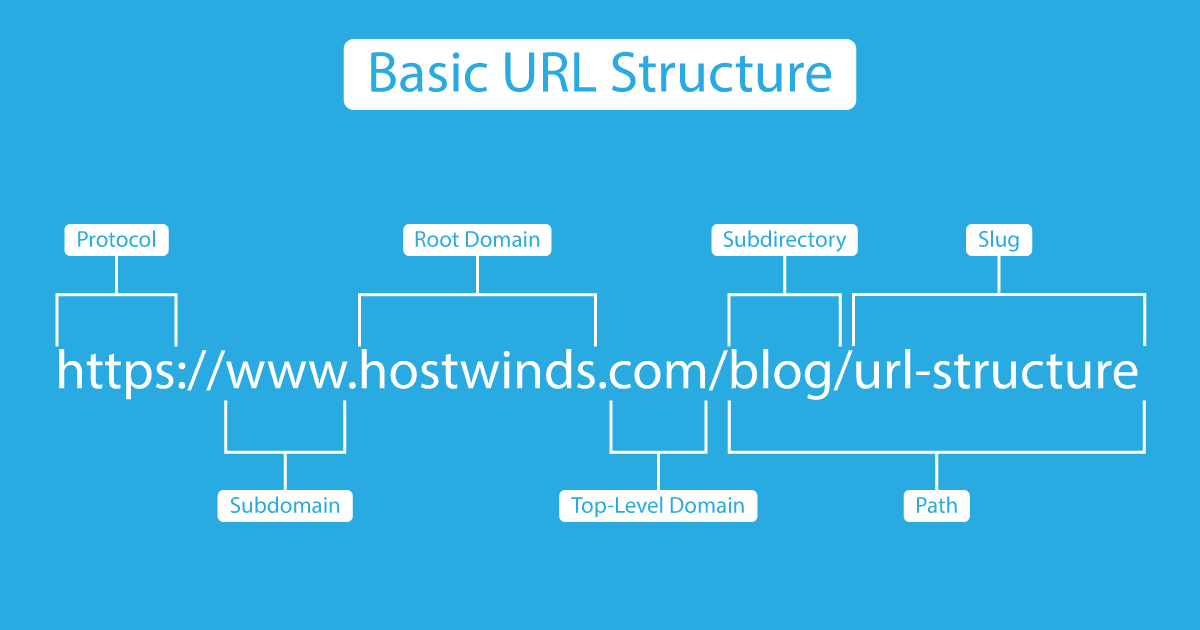
Let’s quickly break down the parts of a URL so we’re all on the same page. Consider this example:
https://www.myshop.cm/fashion/dresses/blue-summer-dress
https://: This is the protocol. The “s” stands for “secure,” meaning the site uses an SSL certificate to protect data. This is a must-have for all modern websites.www.myshop.cm: This is the domain name. The.cmis the country-code top-level domain (ccTLD) for Cameroon, which is a great signal for local SEO./fashion/dresses/: These are the folders or subdirectories. They show the structure and hierarchy of the website, helping to organize content.blue-summer-dress: This is the slug. It’s the final part of the URL that identifies the specific page. This is the part you have the most control over for your individual pages and posts.
Our focus for the rest of this guide will be on creating effective folders and slugs.
Rule #1: Keep it Short and Simple (KISS)
The golden rule of structuring URLs is to keep them as short and descriptive as possible. Long, complicated URLs are hard for users to read, difficult to share, and can be intimidating. Shorter URLs are also easier for search engines to crawl and understand.
Studies have shown a correlation between shorter URLs and higher search rankings. While it’s not the most important factor, it’s an easy win.
Bad Example:
myshop.cm/p?id=8923&category=dresses-summer-collection-2025&item=blue-dress-with-flowers
This is confusing, ugly, and tells the user nothing.
Good Example:
myshop.cm/dresses/blue-summer-dress
This is clean, descriptive, and instantly understandable. When you create a new page or blog post, your CMS (like WordPress) will often automatically generate a URL based on your title. Your job is to edit it down to its simplest, most descriptive form.
Rule #2: Use Keywords Wisely
Your URL is a prime location to include your target keyword for the page. This is one of the strongest signals you can send to Google about the page’s topic. If your page is about “ndole recipes,” the keyword “ndole-recipes” should be in the URL.
Example:
- Page Title: The Ultimate Guide to Making the Perfect Ndole Recipe
- Target Keyword: ndole recipe
- Good URL Slug:
/ndole-recipe-guide
However, do not engage in “keyword stuffing.” Jamming multiple keywords into your URL looks spammy and provides a bad user experience.
Bad Example (Keyword Stuffing):
myshop.cm/buy-ndole-ndole-recipe-best-ndole-cameroon
Good Example (Keyword-Focused):
myshop.cm/recipes/cameroonian-ndole
One or two of your most important keywords are all you need. The goal is to be descriptive, not exhaustive. Properly structuring URLs means finding this balance.
Rule #3: Use Hyphens to Separate Words
This is a simple but critical technical rule. When you need to separate words in your URL slug, always use hyphens (-).
Do not use underscores (_), spaces, or any other character. Google’s official guidelines state that they recommend using hyphens over underscores. Hyphens are treated as word separators, making the URL more readable for search engines. Spaces will be rendered as %20, which looks messy and unprofessional.
Correct:
structuring-urls-for-seo
Incorrect:
structuring_urls_for_seo
structuring%20urls%20for%20seo
Make it a habit: words in a URL slug are always separated by hyphens.
Rule #4: Use Lowercase Letters Only
While URLs can technically contain uppercase letters, using them can sometimes cause issues. Some web servers treat uppercase and lowercase URLs as two different pages, which can lead to duplicate content problems.
For example, a server might see myshop.cm/Dresses and myshop.cm/dresses as separate pages with identical content. This confuses search engines.
To avoid any potential issues and maintain consistency, make it a rule to always use lowercase letters in your URLs. This is a simple best practice that prevents a lot of potential headaches down the line.
Rule #5: Remove Unnecessary “Stop Words”
Stop words are common words like “a,” “an,” “the,” “of,” “in,” “for,” and “but.” While they are necessary for forming grammatically correct sentences, they add unnecessary length to a URL without adding much SEO value.
When editing your URL slug, feel free to remove these words to make it shorter and more focused on the important keywords.
Example:
- Page Title: A Guide to the Best Beaches in Limbe
- Automatic URL Slug:
/a-guide-to-the-best-beaches-in-limbe - Edited URL Slug:
/best-beaches-limbe
The edited version is shorter, cleaner, and still perfectly understandable. This is a key part of structuring URLs effectively.
Rule #6: Create a Logical Folder Structure
The subdirectories, or folders, in your URL should reflect the information architecture of your website. A logical folder structure helps organize your content for both users and search engines, and it can provide valuable context.
A good structure is typically simple and not too deep. Aim for no more than two or three levels of folders.
Good Structure for an E-commerce Site:
myshop.cm/mens-clothing/shirts/long-sleeve-shirt
myshop.cm/womens-clothing/shoes/sandals
This structure is logical. You can easily tell what category and subcategory the product belongs to.
Bad Structure (Too Deep or Illogical):
myshop.cm/products/items/for-men/2025/clothes/shirts/item-789.html
This is messy, too deep, and contains irrelevant information like the year or item numbers.
For most small to medium-sized Cameroonian businesses, a simple structure is best.
- For a blog:
yoursite.cm/blog/post-title - For services:
yoursite.cm/services/service-name - For products:
yoursite.cm/products/product-name
Rule #7: Avoid Dates, Numbers, and Special Characters
It can be tempting to include dates in your blog post URLs, like yoursite.cm/blog/2025/11/my-post-title. While this might seem organized, it can hurt you in the long run.
- It Dates Your Content: A URL with “2025” in it will look outdated in 2027, even if the content is still relevant. This can discourage users from clicking. If you ever want to update the post, the old date in the URL will be misleading.
- It Makes URLs Longer: It adds unnecessary length to the URL.
The same goes for random numbers or parameters, often seen in URLs generated by less SEO-friendly systems.
Bad:
yoursite.cm/?p=123
yoursite.cm/article.php?id=456
These URLs provide zero context about the page’s content. Always use clean, descriptive “permalinks.” If you use WordPress, you can easily set your permalink structure in Settings > Permalinks to “Post name” to ensure clean URLs for all your posts.
Putting It All Together: A Cameroonian Case Study
Let’s imagine you run an online store in Douala that sells locally made fashion accessories. You are writing a blog post about how to style a popular type of necklace.
- Original Title: “Our 5 Best Tips for How to Style an African Beaded Necklace in 2025”
- Target Keyword: style beaded necklace
Let’s apply our rules for structuring URLs:
- Start with the Title:
our-5-best-tips-for-how-to-style-an-african-beaded-necklace-in-2025(This is way too long!) - Keep it Short and Simple: Let’s focus on the core topic.
/how-to-style-an-african-beaded-necklace - Use Keywords: The keyword is “style beaded necklace.” We can simplify it further.
/style-beaded-necklace - Remove Stop Words: The words “how,” “to,” and “an” can be removed.
- Final URL Slug:
/style-beaded-necklace
Now, let’s put it into a logical folder structure on your website.
Final, Perfect URL: yourshop.cm/blog/style-beaded-necklace
This URL is short, descriptive, keyword-rich, easy to read, and helps organize your site. It’s perfect for both a user in Cameroon sharing the link on WhatsApp and for Google’s crawlers trying to understand your content.
Conclusion
Structuring URLs might seem like a small, technical detail in the grand scheme of running your business, but it’s a foundational element of a strong online presence. Clean, descriptive URLs are a signal of quality and professionalism. They build trust with users, improve your click-through rates when shared, and give search engines clear signals about your content.
You don’t need to be an SEO expert to get this right. By following the simple rules we’ve outlined, you can make a significant and positive impact on your website’s performance.
Your action plan is simple:
- For All New Content: Follow these rules every time you create a new page or post. Take the extra 30 seconds to edit your default URL into something clean and effective.
- For Your Most Important Existing Pages: If your key service or product pages have messy URLs, it may be worth updating them. Be careful: when you change a URL, you must implement a 301 redirect from the old URL to the new one to preserve your SEO value.
Start today. Go look at the URLs on your website. Do they clearly communicate what each page is about? If not, you have a clear and actionable opportunity to improve your SEO and provide a better experience for your customers.