
High-Performing Pages: Using Data-Driven Web Design to Convert Paid Traffic into Revenue
You’re spending thousands on Google Ads, Facebook campaigns, and LinkedIn promotions. Traffic is pouring in. But your conversion rates are stuck at 1-2%. Every visitor who bounces represents wasted ad spend, a direct hit to your bottom line. The problem isn’t your ads. It’s your pages. They’re not converting because they weren’t built with data; they were built with opinions, assumptions, and “best practices” that don’t apply to your specific audience.

Data-driven web design changes everything. Instead of guessing what works, you let user behavior, analytics, and testing tell you exactly where your pages fail and how to fix them. This isn’t about vanity metrics or “making it prettier.” It’s about systematically increasing the percentage of paid visitors who take action, whether that’s buying, signing up, or requesting a demo.
The results are dramatic: 30-86% conversion uplifts, better ad ROI, and pages that compound your traffic into revenue. Here’s how to build them.
Why Your Paid Traffic Isn’t Converting (And Why Design Is the Fix)
The Cost of “Gut Feel” Design
Most landing pages fail because they’re designed intuitively, not analytically. Designers create beautiful layouts based on experience. Stakeholders approve what “looks right.” But without representative data, 77-90% of these changes have no positive impact on conversions, and many actively decrease them.
Redesign disasters are even worse. A full site overhaul makes hundreds of simultaneous changes. Even if 20% improve conversions, the other 80% (neutral or negative) can drop revenue by up to 42%. And you’ll never know which changes hurt because everything moved at once.
Paid Traffic Demands Precision
Unlike organic visitors who browse leisurely, paid traffic has specific intent from a specific ad. They expect immediate relevance. If your page doesn’t deliver, they’re gone in seconds. Data-driven design identifies exactly where they drop off and tests fixes that work.
Key insight: With solid data, conversion improvements happen in 29-38% of experiments. Without it, success drops to 10-23%. The difference is millions in revenue.
The Data-Driven Web Design Framework: From Research to Revenue
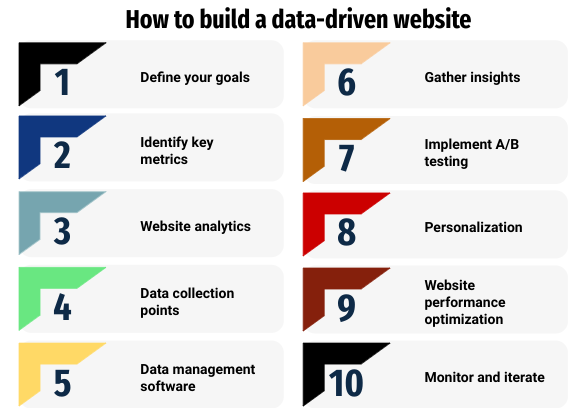
High-performing pages aren’t magic. They follow a repeatable process: research → hypothesize → test → implement → repeat. Here’s how to apply it to convert your paid traffic.
Step 1: Conversion Research – Find the Friction
Success rate boost: Hypotheses based on data improve conversions 30-37% vs. 12-18% for gut feel.
Quantitative analysis (what’s happening):
- Analytics deep dive: Use GA4, Hotjar, or Clarity to map drop-off points. Where do paid visitors abandon? Checkout? Form submission? Hero section?
- Heatmaps & recordings: See exactly where users click, scroll, and rage-click. Friction shows itself visually.
- Funnel analysis: Track paid traffic through your conversion path. Pinpoint the highest-drop stage.
Qualitative research (why it’s happening):
- User testing: Watch 5-10 real users from your ad audience navigate your page. Ask them to complete your goal while thinking aloud.
- Surveys: Exit-intent popups asking “What stopped you from completing your purchase?”
- Heuristic analysis: Expert review using Nielsen’s 10 usability heuristics to spot obvious issues.
Cameroon example: A logistics firm discovered 68% of mobile paid traffic bounced because their WhatsApp CTA was buried below the fold. Moving it to hero position +30% inquiries.
Step 2: Build Data-Backed Hypotheses
Turn insights into testable predictions:
Problem: 72% cart abandonment at checkout Data: Mobile users drop off; desktop converts 2.4x better[2] Hypothesis: Simplifying mobile checkout flow will increase completion rates by 25% Test: Original vs. 3-step mobile-optimized checkout
Pro tip: Prioritize by potential impact × ease of implementation. Fix high-drop pages first.
Step 3: A/B Testing – Validate What Works
The gold standard: Split-test changes on real paid traffic. Only implement winners with statistical significance.
Tools: Optimizely, Google Optimize, VWO.
What to test:
- Hero section: Headlines, CTAs, social proof
- Forms: Field count, button copy, progress indicators
- Trust signals: Security badges, testimonials, guarantees
- Pricing: Layout, anchoring, urgency elements
Example from La Vie en Rose: Desktop “Quick View” converted 2.4x better. Mobile optimization + GA4 fixes led to measurable uplift.
Watch secondary metrics: A CTA that boosts conversions but tanks average order value is a loser.
Step 4: Implement Winners, Scale Insights
Quick wins first: Roll out proven changes across similar pages.
Build your insight library: Document every test. “Red CTA button +18% clicks on mobile paid traffic.”
Personalize by segment: Paid traffic from Facebook? Google? Remarketing? Tailor experiences.
Electrolux case: Moved “You May Also Like” higher + personalized recommendations = higher engagement, clicks, transactions.
Anatomy of a High-Converting Paid Landing Page
Here’s what data-proven pages share:
Hero Section (Above the Fold)
├── Problem-solving headline (matches ad promise)
├── Single, compelling CTA (e.g., “Start Free Trial”)
├── 3-5 bullet benefits (not features)
└── Trust signal (logos, stats, testimonials) Social Proof Section
├── 3 customer quotes with photos
├── “As seen in” media logos
└── Results stats (“5000+ users”) Objection Handling
├── FAQ accordion
├── Pricing guarantee
└── Live chat/WhatsApp Frictionless Conversion
├── 3-field form max
├── Progress bar
└── Mobile-optimized checkout
Mobile checklist (75%+ of paid traffic):
- Load <3s (Core Web Vitals green)
- Thumb-friendly CTAs (>44px)
- No horizontal scroll
- Above-fold conversion path
Measuring Success: Beyond Vanity Metrics
Track these KPIs:
| Metric | Target | Why It Matters |
|---|---|---|
| Conversion Rate | +30% | Core revenue driver |
| Cost per Acquisition | ↓20-40% | Ad efficiency |
| Revenue per Visitor | ↑15-25% | True business impact |
| Mobile Bounce Rate | <50% | Paid traffic reality |
ROI calculation: (Incremental Revenue – Development Cost) / Development Cost
Real results: 9-86% uplifts across 25 case studies using this methodology.
9 Strategies for Using Data-Driven Web Design to Convert Paid Traffic into Revenue
Strategy 1: Build a Behavioral Data Foundation Before Designing Anything
Every high-performing page built on data-driven web design principles begins with a robust foundation of behavioral data collection. Without accurate, comprehensive data on how users interact with your current pages, every design decision remains guesswork regardless of how well-intentioned it is.
Start by ensuring Google Analytics 4 (GA4) is properly configured with custom events tracking every meaningful interaction on your paid landing pages: button clicks, form field engagement, scroll depth milestones, video plays, and CTA visibility. Set up goal tracking for every primary and micro-conversion action so you can measure funnel drop-off at each stage. Layer behavioral intelligence tools like Hotjar, Microsoft Clarity, or Crazy Egg on top of your quantitative analytics to capture heatmaps, scroll maps, and session recordings that show exactly where users click, how far they scroll, where they hesitate, and where they abandon the page.
This behavioral data layer is the raw material for every subsequent design decision. It tells you not just how many people converted but precisely what the people who did not convert actually did on the page, which is where the most valuable design insights live.
Strategy 2: Engineer Precise Message Match Between Ads and Landing Pages
Message match is the alignment between the specific promise, language, and visual cues of your ad and the first experience a visitor has when they land on your page. It is one of the most powerful, most underutilized, and most easily actionable principles in data-driven web design for paid traffic.
When someone clicks an ad promising “Free Logistics Audit for Cameroon Businesses,” they arrive on your page carrying a specific expectation. If the headline reads “Welcome to our Consulting Services,” that expectation is immediately violated, even subtly, and the visitor’s brain registers a mismatch that erodes trust and increases the probability of bouncing. Perfect message match means the headline, supporting copy, imagery, and CTA on the landing page explicitly echo the language and promise of the ad that brought the visitor there.
Data makes this measurable. By segmenting your analytics by campaign and ad set, you can identify exactly which traffic sources have the highest bounce rates and poorest conversion rates. In many cases, the primary cause is weak message match. A/B test landing page headlines that directly mirror your top-performing ad copy against your current generic headlines, and measure the conversion rate impact. Even a 20% improvement in message match alignment can produce a 40–60% improvement in conversion rate for cold paid traffic.
Strategy 3: Use Heatmaps and Scroll Maps to Redesign for Real User Behavior
Heatmaps and scroll maps reveal the brutal truth about how users actually experience your paid landing pages versus how you intended them to. Most businesses that install heatmap tools for the first time discover the same uncomfortable reality: visitors are not reading what the designers spent the most time on, they are clicking on elements that are not linked, and the majority are abandoning the page well before reaching the primary call-to-action.
Use click heatmaps to identify where users are actually clicking and compare that to where you want them to click. If users are clicking on a non-interactive image or a heading they apparently expect to be a link, that represents a design expectation failure that needs to be addressed. Move your primary CTA to the area that receives the most natural click attention. Use scroll maps to understand what percentage of your paid traffic actually reaches your key content sections, testimonials, and conversion forms. If only 30% of visitors scroll to your lead capture form, you need to either move the form higher on the page or create more compelling above-the-fold content that motivates users to scroll.
Session recordings add qualitative depth to these quantitative heatmap insights. Watching real user sessions on your paid landing pages regularly reveals specific friction points, fields that users start and abandon, CTAs they hover over but do not click, navigation elements that distract them away from the conversion path, that no amount of aggregate analytics data would surface.
Strategy 4: Structure Landing Pages Around Conversion Funnel Data
Every paid landing page is a micro-funnel with multiple stages: initial attention and engagement, value comprehension, trust building, and conversion action. Data-driven web design maps the drop-off rate at each stage and prioritizes design changes that address the stages with the highest abandonment.
Use GA4 funnel exploration reports to build a visual representation of how paid traffic moves through your page. If 80% of visitors engage with your headline content but only 40% scroll to your social proof section and only 12% reach and interact with your form, you have two distinct problem areas: the scroll between the headline and social proof (likely a relevance or engagement issue), and the form itself (likely a friction or trust issue). Each problem requires a different design intervention, and only funnel data tells you which one is the priority.
This structured funnel perspective also reveals the value of micro-conversions: smaller commitment actions that build momentum toward the primary conversion. A visitor who watches a 60-second explainer video is significantly more likely to complete a lead form than one who doesn’t. A visitor who expands an FAQ accordion is demonstrating active interest. Designing the page to guide users through these micro-conversions and tracking them is a data-driven technique that consistently improves primary conversion rates.
Strategy 5: Implement Continuous A/B Testing With Statistical Rigor
A/B testing is the backbone of data-driven web design for paid traffic optimization. It is the mechanism by which hypotheses derived from behavioral data become validated improvements that compound conversion rate gains over time. Without A/B testing, even well-researched design changes remain educated guesses. With it, every change you make is backed by statistically significant evidence.
Build a structured A/B testing program by prioritizing test hypotheses based on the magnitude of potential conversion impact and the confidence of the underlying behavioral evidence. Test the highest-impact elements first: page headlines, primary CTA text and placement, hero images, value proposition framing, and form length. Each test should have a single variable, a clearly defined success metric, and a minimum sample size calculated to ensure statistical significance before declaring a winner.
Maintain a test log that records every hypothesis, the behavioral data that informed it, the test design, the results, and the insights derived. Over 12 months of disciplined A/B testing on high-traffic paid landing pages, most businesses accumulate compounding conversion improvements that dwarf any single page redesign. A series of 10 tests, each producing a 10% conversion rate improvement, compounds to a 160% improvement over baseline—a result that no one-time design overhaul can reliably produce.
Strategy 6: Personalize the Page Experience by Traffic Source and Audience Segment
Not all paid traffic arrives with the same intent, context, or level of familiarity with your brand. A visitor clicking on a branded search ad “Douala web design agency” has fundamentally different expectations than a visitor clicking on a cold Facebook ad targeting “small business owners in Cameroon.” Serving both with the same page experience means neither is receiving the optimal experience for their specific context.
Dynamic content personalization, enabled by modern marketing technology, allows you to serve different page headlines, hero images, CTAs, and even social proof blocks to visitors based on the ad campaign, audience segment, device type, or geographic location that brought them to the page. A visitor arriving from a Google Search ad for a specific service sees a headline that directly names that service. A retargeting visitor who has already visited your site sees a headline that acknowledges their familiarity and addresses their likely hesitation.
Data drives every personalization decision: segment your conversion rate data by traffic source and audience, identify the segments with the greatest gap between traffic volume and conversion rate, and design personalized experiences specifically to close that gap. This approach consistently outperforms generic landing pages by 30–50% in A/B tests across industries, making it one of the highest-ROI applications of data-driven web design for paid traffic.
Strategy 7: Optimize Forms Using Behavioral Field-Level Data
Your lead capture form or checkout process is the final gate between a visitor and a conversion, and field-level behavioral data consistently reveals it to be the most friction-laden part of most paid landing pages. Most businesses design forms based on what information they want to collect rather than what visitors are willing to provide, resulting in high abandonment rates that represent enormous wasted ad spend.
Form analytics tools like Hotjar’s form analysis, Zuko, or Formisimo provide field-level data showing where users start filling out a form, which fields they skip or abandon, how long they spend on each field, and where they give up entirely. This data is extraordinarily actionable. If 60% of form abandonment happens at the “Company Size” dropdown, that field is likely causing more harm than the data it provides is worth. Remove it, and your form completion rate will likely improve significantly.
Apply the principle of progressive disclosure to high-intent but friction-sensitive traffic: start with a minimal form (name and phone number or email), then collect additional qualifying information in subsequent steps or follow-up communications. Test single-step versus multi-step forms, as multi-step forms often convert at higher rates by reducing the perceived commitment of the initial action. Every form change should be A/B tested and measured against your primary conversion metric, not just the form completion rate in isolation.
Strategy 8: Optimize Page Speed Specifically for Paid Traffic Landing Pages
Page speed has a disproportionate impact on paid traffic conversion rates compared to organic traffic, for a simple reason: paid visitors have explicitly been promised a fast, relevant answer to their query and have a lower tolerance for friction. Every additional second of load time erodes the trust built by the ad and increases bounce probability before the page has even been seen.
Google’s research shows that a landing page loading in 1 second converts 3x better than one loading in 5 seconds. For businesses running paid campaigns in mobile-first markets like Cameroon, where network speeds vary significantly, this effect is even more pronounced. Data-driven web design for paid traffic means maintaining separate performance budgets and monitoring for your highest-traffic paid landing pages, not just your homepage.
Use Google PageSpeed Insights and GTmetrix to establish a performance baseline for each key paid landing page. Prioritize LCP (Largest Contentful Paint) optimization by preloading hero images, deferring non-critical JavaScript, and implementing server-side caching. Compress and serve all images in WebP format. Consider building dedicated paid landing pages as lightweight, single-purpose HTML/CSS files rather than loading them through a full CMS stack if performance is a persistent challenge. Track performance metrics weekly and investigate any degradation immediately, as a page that slows down due to a new plugin or additional content can silently drain your paid traffic ROI.
Strategy 9: Build Trust Signal Placement Around Behavioral Attention Data
Trust signals, including testimonials, client logos, security badges, industry certifications, and social proof metrics, are among the most powerful conversion drivers on any paid landing page. But their placement is just as important as their presence, and most businesses place trust signals based on visual design convention rather than behavioral attention data.
Heatmap and eye-tracking data consistently shows that users pay disproportionate attention to the first screen they see (above the fold), the area immediately surrounding the primary CTA, and the content they encounter right before deciding whether to convert. Use this data to position your most persuasive trust signals at exactly these behavioral attention hotspots rather than burying them at the bottom of the page.
For Cameroon businesses, localized trust signals carry additional weight. Testimonials from recognizable local companies, awards or recognitions from Cameroonian business associations, and explicit mentions of local presence (Douala address, Cameroonian phone number, WhatsApp availability) perform significantly better than generic global credentials. Test different combinations and placements of trust signals using A/B experiments, and use heatmaps to verify that visitors are actually engaging with your social proof rather than scrolling past it.
Tools for Data-Driven Web Design
The following toolkit provides the behavioral intelligence and testing infrastructure needed to execute data-driven web design for paid traffic:
Behavioral Analytics and Heatmapping: Hotjar, Microsoft Clarity (free), Crazy Egg, and Lucky Orange provide heatmaps, scroll maps, and session recordings that reveal real user behavior on your landing pages.
Quantitative Analytics: Google Analytics 4 is the essential foundation for tracking conversion rates, funnel drop-off, audience segmentation, and traffic source performance.
A/B Testing Platforms: VWO, Optimizely, Convert.com, and Google’s free A/B testing capability via GA4 Experiments allow you to run controlled tests and measure conversion impact with statistical precision.
Form Analytics: Zuko (formerly Formisimo) and Hotjar’s form analysis module provide field-level data that identifies exactly where form abandonment occurs.
Performance Monitoring: Google PageSpeed Insights, GTmetrix, and Lighthouse provide technical performance audits. SpeedCurve and Calibre enable continuous performance monitoring over time.
Personalization Platforms: Mutiny, Intellimize, and Segment enable dynamic content personalization based on traffic source, audience segment, and behavioral signals.
Pro resources: