


Google Ads AI Labels: What Advertisers Need to Know About New AI Disclosures
Google is expanding transparency around AI-generated advertising with new labels that show when an ad was created or edited using artificial intelligence.
The update applies across Google Search, YouTube and Discover. According to Search Engine Roundtable, Google Ads will now show AI creation or editing information mainly inside the My Ad Center panel under a section called “How this ad was made.” In some regions, depending on local requirements, an AI label may also appear directly on the ad itself.
For advertisers, this is more than a small interface update. It signals that AI-assisted creative production is becoming a normal part of digital advertising—but also one that needs clearer disclosure, stronger governance and better internal processes.
What Are Google Ads AI Labels?
Google Ads AI labels are disclosures that tell users whether an ad was created or edited with AI.
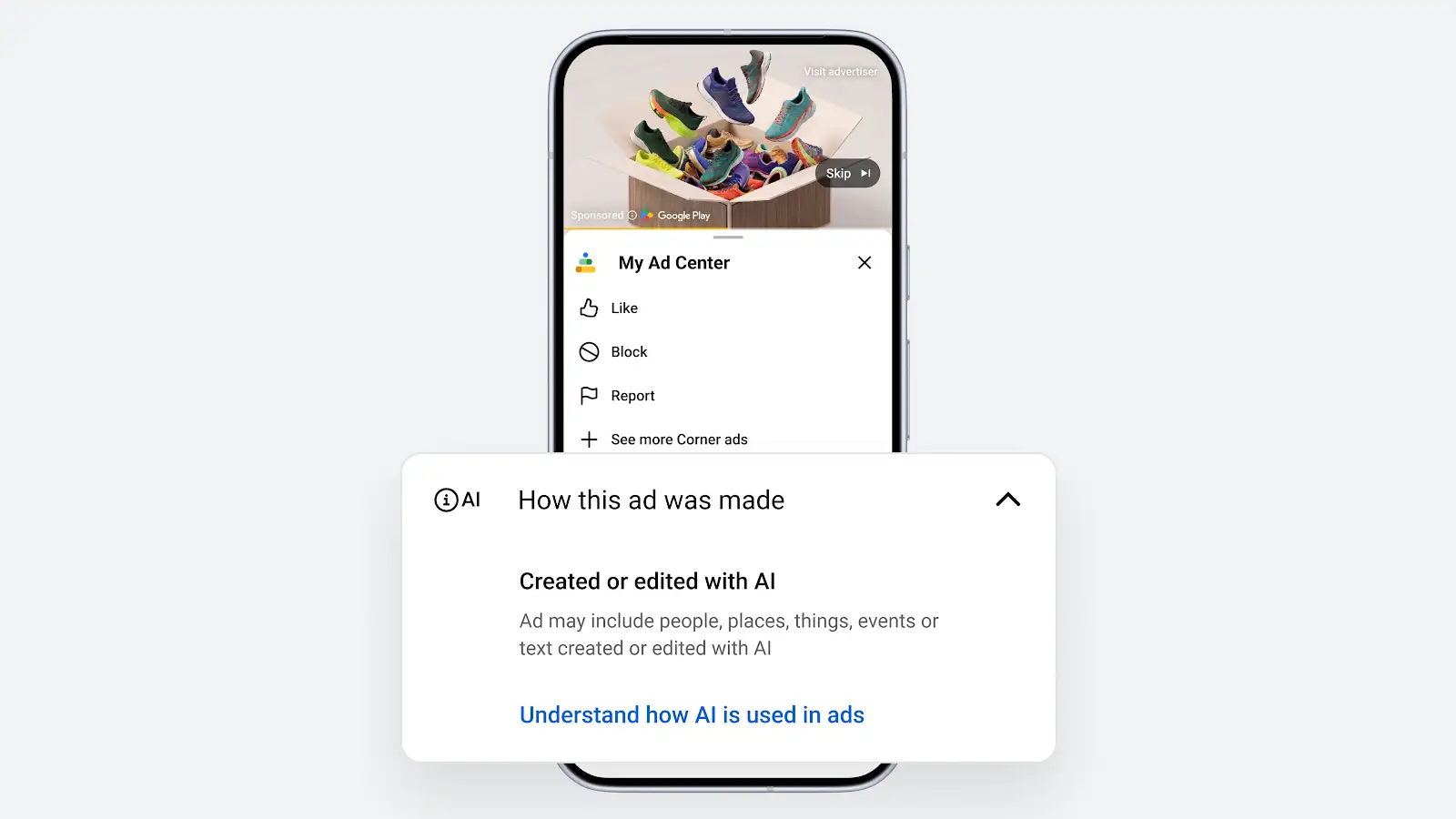
Google says it is adding a “How this ad was made” section to the My Ad Center panel. Users can access this panel globally by selecting the three-dot menu or info icon on ads across Search, YouTube and Discover. The panel will indicate whether AI was used to create or alter the ad.
The label is designed to give people more context about the ads they see.
This matters because generative AI can now help advertisers create images, videos, audio, copy and personalized ad assets at scale. Google’s own help documentation notes that advertisers may use AI for tasks ranging from automated copywriting to generating visual, video and audio assets.
Where Will the AI Labels Appear?
The main disclosure will appear inside My Ad Center, under “How this ad was made.”
Users can open My Ad Center from an ad by selecting the three-dot menu. From there, Google may show several options, including who paid for the ad, why the ad was shown, whether AI was used to create or edit the ad, and the option to report the ad.
In some markets, the label may also appear directly on the ad.
Google says that for campaigns targeting the European Union, India and New York, ads with assets designated as AI-created or AI-edited will also include visible overlays on the ads.
That means advertisers running international or multi-region campaigns should not assume AI disclosures will look the same everywhere.
When Will Google Apply AI Labels Automatically?
Google will automatically add disclosures when advertisers use Google’s own generative AI advertising tools to create or edit ad assets.
Search Engine Roundtable reported that if an advertiser uses Google’s generative AI tools inside the Google Ads platform, Google will automatically add a disclosure to the ad’s My Ad Center panel.
Google’s help documentation also says Google may label assets in some cases, including where local law requires it or when Google receives relevant signals from other platforms. If advertisers use Google’s fully automated features to create and serve creatives, assets may be labeled on their behalf.
In those cases, Google says the labels cannot be overwritten.
What If Advertisers Use AI Outside Google Ads?
If advertisers create or edit assets using external AI tools, Google is introducing a control that allows them to manually indicate whether generative AI was used.
This means an advertiser using tools outside Google Ads—such as an AI image generator, video editor or copywriting assistant—may need to label those assets themselves. Search Engine Roundtable described this as an “honor system” when AI is used outside Google’s own ad tools.
Google’s support documentation says advertisers can disclose AI use by labeling ads and assets directly, using Google product settings, or relying on automatic labels applied by Google in some situations.
For agencies and PPC teams, this creates a new workflow requirement: creative teams need to track whether AI was used before assets are uploaded, approved and launched.
How Advertisers Can Manage AI Labels
Google says the AI label setting will roll out gradually throughout July across Google Ads, Display & Video 360, Campaign Manager 360, Merchant Center and Ads Editor.
Advertisers can manage labels during campaign creation or when editing existing assets.
Google’s help documentation says advertisers can review assets, choose “Manage AI label,” and select whether an asset should be labeled as created or edited with AI. Advertisers can also review the AI label status column in the Asset Library and asset reporting.
This gives advertisers a practical way to audit AI-labeled assets, but it also means teams need consistent naming, documentation and approval processes.
Why Google Is Introducing AI Ad Labels
Google says the goal is to help people better understand the ads they see while giving advertisers tools to manage evolving transparency standards.
The update also fits into a wider industry shift.
AI is making it faster and cheaper to create ad assets, but it can also make it harder for users to know whether an image, video or message reflects something real, synthetic or heavily altered.
Google says it already embeds machine-readable signals such as SynthID and C2PA metadata into outputs from its generative AI tools. It also introduced disclosure requirements for synthetic or digitally altered content in election ads in 2023.
The new Google Ads AI labels extend that transparency logic into broader advertising formats.
What This Means for Advertisers
For advertisers, the update creates both a compliance responsibility and a trust opportunity.
AI-generated creative is not prohibited simply because it uses AI. Google’s position is that misleading and deceptive ads remain prohibited whether they are created with AI or not.
That distinction matters.
The issue is not whether AI was involved. The issue is whether the ad is transparent, compliant and truthful.
Advertisers should now treat AI disclosure as part of the campaign production process, not as an afterthought.
Why SMEs Should Pay Attention
Small and medium-sized businesses are likely to use AI advertising tools because they reduce production costs.
A local business may use AI to create product images, promotional graphics, video variations or ad copy without hiring a large creative team. That can be valuable, especially for businesses with limited budgets.
But SMEs also face risks if they do not manage AI use carefully.
An AI-generated ad may unintentionally misrepresent a product, exaggerate a result, create unrealistic visuals or use imagery that does not match the actual business. If that ad is labeled as AI-created, users may scrutinize it more closely.
For small businesses, the safest approach is to use AI for speed and variation, but keep human review in place for accuracy, brand fit and customer trust.
Practical Checklist for Google Ads AI Labels
Advertisers should prepare for the change by updating their creative workflow.
1. Track AI Use From the Start
Do not wait until upload to ask whether an asset was created or edited with AI.
Document AI use during concepting, copywriting, image generation, video editing and asset resizing.
2. Create an Internal AI Disclosure Policy
Agencies and in-house teams should define what counts as AI-created or AI-edited content.
For example, simple cropping may not require the same treatment as generating a realistic product scene or editing a person’s appearance.
3. Review Regional Campaign Targets
Campaigns targeting the EU, India and New York may show visible AI overlays when assets are designated as AI-created or AI-edited.
Advertisers should consider how visible labels may affect creative design, trust and performance.
4. Check the Asset Library
Use the AI label status column in Google Ads asset reporting to review which assets are labeled, unlabeled or need attention.
5. Avoid Misleading Creative
AI labels do not protect advertisers from policy violations.
Any ad that misleads users, fabricates claims, misrepresents a product or creates deceptive impressions can still create compliance problems.
6. Train Creative and Media Teams Together
AI disclosure is not only a media-buying issue. Designers, copywriters, video editors, PPC managers and legal reviewers all need to understand the process.
Will AI Labels Affect Ad Performance?
It is too early to know how Google Ads AI labels will affect click-through rates, conversion rates or user trust.
Some users may ignore the label. Others may appreciate the transparency. In sensitive categories, visible AI disclosure could influence how people interpret the ad.
Advertisers should monitor performance carefully, especially in regions where labels appear directly on ads.
Useful metrics to watch include:
- Click-through rate
- Conversion rate
- Engagement rate
- Creative approval issues
- Brand lift
- Negative feedback
- Ad reporting rates
- Landing page conversion quality
The key is to test rather than assume.
AI-generated creative can perform well, but transparency may change how users respond depending on the product, market and message.
The Bigger Shift: AI Advertising Is Becoming Regulated Creative
The introduction of Google Ads AI labels shows that AI in advertising is moving from experimentation into governance.
Advertisers are no longer just asking, “Can AI help us make more ads?”
They also need to ask:
- Was this asset created or edited with AI?
- Does it need a label?
- Does the label appear only in My Ad Center or directly on the ad?
- Is the creative accurate?
- Are claims supported?
- Are people, places or products represented truthfully?
- Are we compliant in every target region?
This is especially important as AI tools become embedded into Performance Max, Demand Gen, YouTube, Display and shopping workflows.
Creative speed is increasing. Disclosure discipline now needs to increase with it.
Conclusion: Google Ads AI Labels Make Transparency Part of PPC Strategy
Google Ads AI labels mark an important step in the future of AI-powered advertising.
The update will show users when ads were created or edited with AI, mainly through the “How this ad was made” section in My Ad Center. In some regions, AI labels may also appear directly on ads.
For advertisers, the message is clear: AI-generated creative is becoming mainstream, but it must be managed responsibly.
Agencies, brands and SMEs should update their workflows now. Track AI use, label assets correctly, review regional requirements, and make sure every AI-assisted ad remains accurate, transparent and compliant.
AI can help advertisers create faster. Google Ads AI labels mean they also need to disclose smarter.


