


It can feel like a full-time job just to keep track of the constant stream of news and announcements from the major players in tech and social media. One week, a new AI tool is the talk of the town; the next, a social media platform completely changes its rules. While it’s easy to get overwhelmed by the sheer volume of information, paying attention to the most significant industry updates is crucial for anyone whose work touches the digital world. These changes aren’t just minor tweaks; they often signal broader shifts in technology and user behavior that can create new opportunities and render old strategies obsolete.
This month is no exception. We have seen major moves in AI content creation, software development, graphic design, and online community building. Each of these developments has the potential to impact your workflow, your marketing strategy, and even your business model. Whether you’re a small business owner trying to create engaging social media content, a developer looking to code more efficiently, or a marketing manager responsible for an online community, these updates matter to you.
This article will cut through the noise and give you a clear, concise breakdown of what you need to know. We will explore each of the four key updates, explain what the changes mean in practical terms, and discuss the potential opportunities and challenges they present. By understanding these shifts now, you can better prepare your business or your personal brand to adapt and thrive.
1. OpenAI’s Sora App Arrives on Android, Democratizing AI Video
The world of AI-powered content creation has been dominated by text and image generators, but video has always been the next major frontier. OpenAI’s Sora model captured the public’s imagination with its ability to generate stunningly realistic and creative video clips from simple text prompts. After a successful launch on iOS, the first of our major industry updates is that the Sora app is now officially available on Android.
This is a significant move that vastly expands the accessibility of mobile AI video creation. With Android’s massive global market share, millions more creators, marketers, and casual users now have a powerful video generation tool right in their pockets.
What Does the Sora App Do?
The Sora app is more than just a simple text-to-video generator; it’s a social platform built around AI-generated content. Here are some of its key features:
- TikTok-Style Feed: The app opens to a vertically scrolling feed of AI-generated videos created by other users. This provides a constant stream of inspiration and showcases the model’s capabilities.
- Video Generation: Users can enter text prompts to create their own short videos. The app guides them through the process, allowing for a high degree of creative control.
- “Cameo” Feature: This standout feature allows users to create videos starring themselves or their friends. By using images to create reusable “characters,” users can place these digital avatars into various AI-generated scenes, opening up a world of personalized content, memes, and stories.
- Remixing and Sharing: Like other social platforms, Sora is built on the concept of sharing and iteration. Users can be inspired by others’ creations and easily share their own videos within the app and to other social networks.
Why the Android Launch Is a Big Deal
The expansion to Android is a pivotal moment for mobile AI. While the iOS launch was a huge success, attracting over a million downloads in its first week, the Android release brings Sora to a much larger and more diverse global audience. This has several important implications:
- Increased Accessibility for Marketers: Small businesses and solo entrepreneurs, who may not have the budget for professional video shoots, can now create high-quality, custom video ads and social media content directly from their Android phones. This levels the playing field, allowing smaller players to produce visually compelling content that was previously out of reach.
- A Surge in User-Generated AI Content: With millions of new potential creators, we can expect to see an explosion in the volume and variety of AI-generated video content online. This will likely lead to new trends, new forms of digital art, and new ways of storytelling.
- Intensified Competition: The Android launch puts pressure on other tech giants like Google and Meta to accelerate the development and release of their own competing mobile video generation tools. This competition will drive innovation, leading to even more powerful and user-friendly AI creative tools in the near future.
Challenges and Considerations
Of course, the widespread availability of such powerful technology is not without its challenges. OpenAI has already faced criticism regarding the potential for misuse, particularly in the creation of deepfakes. The company is actively working on safety measures, including content credentials and detection tools, but the debate around AI ethics and responsible use will only intensify as the user base grows. For businesses and creators, this means it is more important than ever to be transparent about the use of AI in their content to maintain audience trust. This is one of those industry updates that is as much about ethics as it is about technology.
2. Cursor 2.0 Revolutionizes Coding with Multi-Agents and Voice Control
For software developers, the hunt for tools that can increase efficiency and streamline complex tasks is never-ending. The second of our key industry updates comes from the world of AI-assisted coding. Cursor has released version 2.0 of its AI-first code editor, and it’s packed with groundbreaking features that could fundamentally change how developers write and review code.
Cursor is an editor built on top of the foundation of VS Code but is specifically designed to integrate AI deeply into every aspect of the coding workflow. The 2.0 release introduces several “agentic” features that move beyond simple code completion to a more collaborative and powerful form of AI partnership.
Key Features of Cursor 2.0
- Multi-Agents: This is the flagship feature of the new release. Developers can now run up to eight AI agents in parallel to work on a single prompt or task. Each agent operates in its own isolated copy of the codebase, preventing file conflicts. This means a developer can ask the AI to tackle a complex feature, and multiple agents can work on different parts of the problem simultaneously, presenting several potential solutions for the developer to review.
- Composer Model: Cursor 2.0 introduces a new proprietary coding model called Composer, which is described as a “frontier model that is 4x faster than similarly intelligent models.” This focus on speed is crucial for maintaining a fluid workflow and reducing the waiting time associated with generating complex code blocks.
- Voice Mode: Taking a cue from consumer AI assistants, Cursor now includes built-in voice control. Developers can speak their instructions and prompts directly to the editor, further blurring the line between conversational direction and technical execution.
- Sandboxed Terminals: To address security concerns about AI agents running commands, Cursor 2.0 has made sandboxed terminals the default on macOS. This means that commands run by the AI operate in a secure environment with limited permissions, preventing them from accessing the internet or files outside the project workspace without explicit permission.
- Team Commands: For development teams, Cursor now allows admins to define custom commands, rules, and prompts that are automatically applied to all team members. This helps ensure consistency in coding standards and allows teams to share best practices for interacting with the AI.
The Impact on Developers and Businesses
Cursor 2.0 represents a significant step toward a future where a developer’s primary role is that of an architect and a reviewer, with AI agents acting as a team of tireless junior developers.
- Accelerated Development Cycles: The ability to deploy multiple AI agents on a single problem can drastically reduce the time it takes to build new features, fix bugs, or refactor code. This increased efficiency can be a massive competitive advantage for businesses.
- Enhanced Creativity and Problem-Solving: By having multiple agents propose different solutions, developers are exposed to a wider range of approaches. This can lead to more creative and robust solutions and can be a powerful learning tool.
- Improved Onboarding and Accessibility: For new developers, an AI-powered editor like Cursor can act as an invaluable pair programmer, offering guidance, explaining complex code, and helping them adhere to best practices. This could shorten the learning curve and make software development more accessible.
This is one of the more technical industry updates on our list, but its implications are broad. As these AI-assisted tools become more powerful, they will change not only how code is written but also how software companies are structured and how technical talent is evaluated.
3. Canva Makes Professional Design Free with the All-New Affinity Suite

In a move that sent shockwaves through the graphic design community, Canva has announced its most audacious play yet. Following its acquisition of Affinity last year, Canva has relaunched the entire professional design suite as a completely free product. This is arguably one of the most disruptive industry updates we have seen in the creative software space in years.
Affinity has long been respected as a powerful, low-cost alternative to Adobe’s subscription-based software. The suite includes Affinity Designer (a vector illustration tool), Affinity Photo (a photo editing tool), and Affinity Publisher (a page layout tool). Previously sold as a one-time purchase, the entire reimagined and unified suite is now free for everyone.
What’s New in the All-New Affinity?
- Unified Platform: The previously separate apps have been integrated into a single, powerful platform. Users can now seamlessly switch between vector, photo, and layout tools without ever leaving the application, creating a more fluid and uninterrupted workflow.
- Customizable Studios: The new Affinity introduces a high degree of personalization. Creatives can mix and match tools and panels to build a workspace that fits their specific needs. These custom “studios” can be saved and even shared with other users.
- Free for Everyone: This is the headline news. The full, professional-grade Affinity experience is now available at no cost. There is no stripped-down “free” version; users get access to the complete set of high-performance tools.
- Canva AI Integration: For users with a Canva premium account, a new “Canva AI Studio” is available directly inside Affinity. This integrates familiar Canva AI features like Generative Fill, Expand & Edit, and Remove Background into the professional workflow, speeding up repetitive tasks.
- Canva Export: Projects created in Affinity can now be easily exported to Canva, bridging the gap between professional, craft-focused design and the collaborative, template-driven world of Canva.
A Shift in the Creative Industry
This move by Canva is a direct challenge to Adobe’s long-standing dominance in the creative software market. By removing the price barrier to professional-grade tools, Canva is making a powerful statement.
- Democratization of Professional Design: Millions of students, aspiring designers, small business owners, and non-profits who could not afford an expensive Adobe subscription now have access to tools that can produce professional-quality work. This will undoubtedly lead to a new wave of creativity from a much broader range of people.
- Pressure on Subscription Models: Canva is betting that it can attract users into its broader ecosystem (where it offers premium plans, stock assets, and business features) by making its top-tier design tool free. This will put immense pressure on Adobe and other companies that rely on high-priced subscription models for their core software.
- A Blurring of Lines: The integration between Affinity and Canva signals a future where the line between “professional” and “casual” design tools continues to blur. This creates a powerful, end-to-end workflow where a professional designer can create a brand identity in Affinity and then easily hand it off to a marketing team to create social media posts in Canva.
This is one of those industry updates that will be discussed for months to come. It lowers the barrier to entry for professional design and could permanently alter the financial and competitive dynamics of the creative software industry.
4. Facebook Offers More Flexibility with Group Privacy Settings
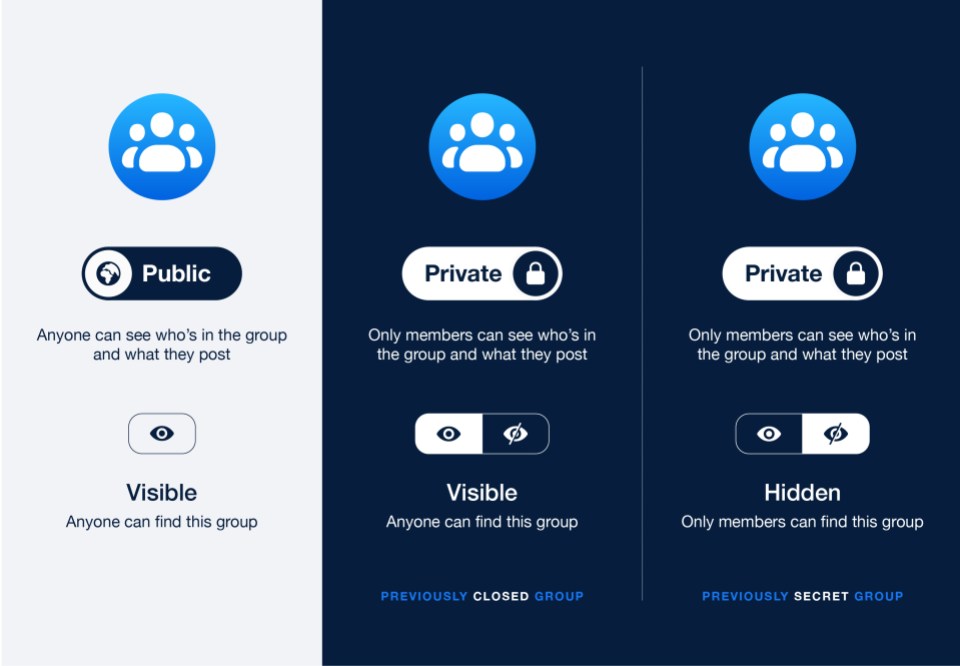
The final item on our list of major industry updates concerns the world of online communities. For years, one of the cardinal rules of Facebook Groups has been that privacy settings were a one-way street: a public group could be made private, but a private group could never be made public. This was done to protect the privacy of members who had joined under the assumption that their posts would not be visible to everyone.
Now, in a significant policy reversal, Facebook has announced that it will allow admins of private groups to switch them to public. The platform has built-in several safeguards to manage this transition.
How the New Group Privacy Change Works
- Admin-Initiated Change: Only a group’s admin can make the change from private to public.
- Three-Day Grace Period: When an admin initiates the change, there is a three-day period before it becomes final, giving other admins time to consider the implications.
- Member Notifications: All group members will be notified about the pending change through various in-app alerts.
- Past Content Remains Private: This is the most crucial safeguard. All posts, comments, and photos that were shared while the group was private will remain private. They will only be visible to people who were members of the group before it went public.
- New Content is Public: Any new content posted after the switch to public will be visible to everyone on Facebook, just like in any other public group. Users will see a reminder and a globe icon when they post for the first time in a newly public group.
- The Change is Reversible: If the move to public does not work out, admins can switch the group back to private.
Implications for Community Managers and Brands
This change provides community managers with a new strategic option for growth, but it also comes with significant responsibilities.
- New Growth Pathway: Many large, successful groups started as small, private communities. This change gives admins a path to “graduate” their community to a public forum, dramatically increasing its discoverability and potential for growth without losing the history and culture built during its private phase.
- Potential for Member Backlash: Despite the safeguards, some members will inevitably be uncomfortable with the change. They may have joined the group specifically because it was a private space. Admins must be prepared to communicate clearly, explain the rationale for the change, and handle feedback and criticism from their members.
- Strategic Decision-Making: For brands that run private customer communities, this presents a new strategic question. A private group is excellent for fostering deep relationships and gathering honest feedback. A public group is better for brand awareness and top-of-funnel marketing. The ability to switch between them allows for more flexible, long-term community planning.
This update may seem small compared to the others on this list, but for the millions of people who manage and participate in Facebook Groups, it’s a fundamental change to the social contract of their communities. It is one of the most community-focused industry updates we have seen from Meta in some time.
The digital world does not stand still, and this month’s developments in AI, software, and social media are a clear reminder of that. From the creative potential unlocked by Sora on Android and the freely available Affinity suite to the efficiency gains promised by Cursor 2.0 and the new community strategies enabled by Facebook, these industry updates offer a glimpse into the future of digital work and interaction.
Staying informed is the first step. The next is to think critically about how these changes affect you. Does a free professional design tool open up new possibilities for your business? Could an AI coding assistant help you build your product faster? Taking the time to understand these trends and adapt your strategy is what separates the businesses that thrive from those that get left behind.
What are your thoughts on these industry updates? Which one do you think will have the biggest impact on your work or business? Share your perspective in the comments below


