


Meta Advantage+ Creative Enhancements: How to Control Automatic Layout Adjustments
Meta Advantage+ creative is designed to turn one approved asset into multiple versions that Meta can match to different people and placements. Depending on your campaign and account, the system may resize images, extend backgrounds, adjust visual presentation, overlay text, animate static graphics or add music.
That flexibility can improve creative coverage. It can also create a brand-control problem.
A carefully designed product image may be cropped differently in Stories. A muted campaign visual may appear brighter or more saturated. Text that was positioned inside a safe area may move too close to an interface element. Music may be technically appropriate for the content while still feeling completely wrong for the brand.
The right response is not to disable every automated feature automatically. It is to decide which elements Meta can optimize safely and which elements must remain fixed.
What Meta Advantage+ Creative Actually Changes
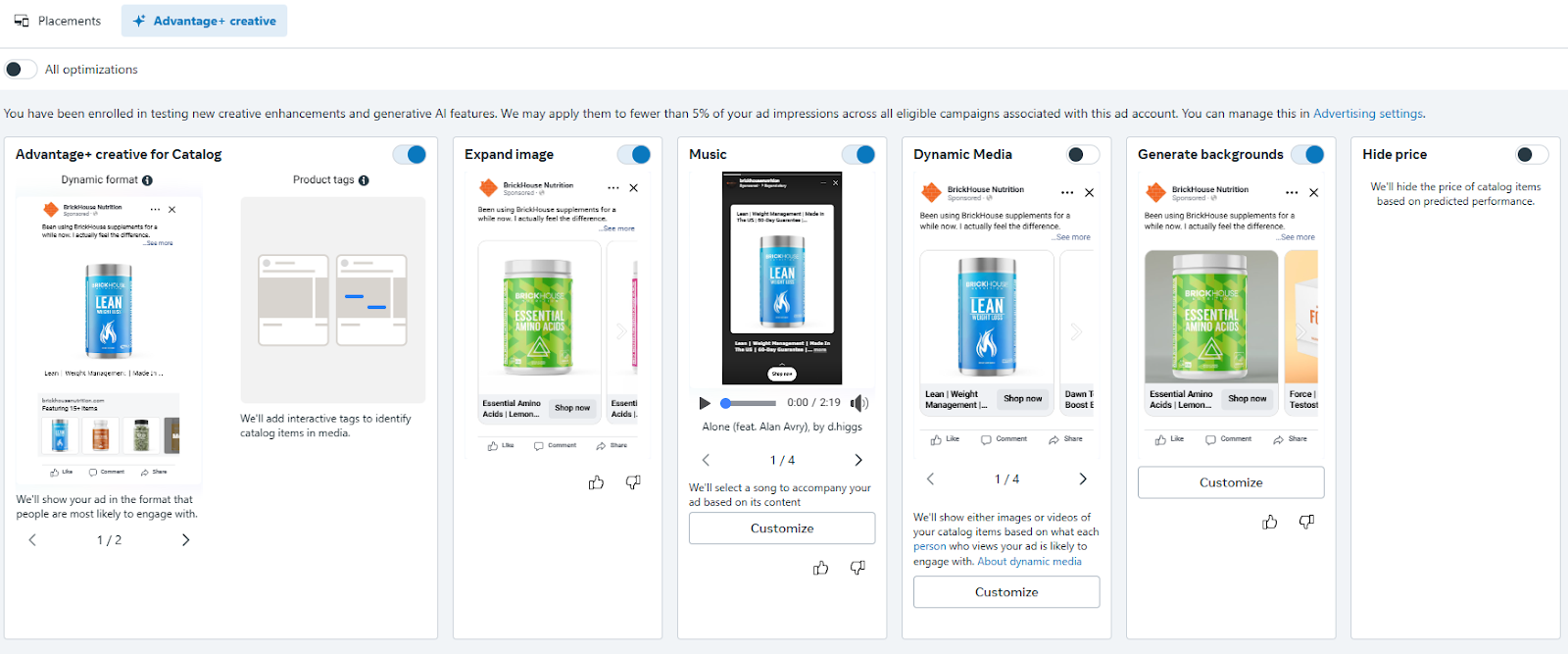
Advantage+ creative operates at the ad level and includes a collection of individual enhancements rather than one universal adjustment. Meta describes these tools as ways to generate and optimize images, video, text and audio for different viewers and placements. Available features can include image expansion, background generation, text generation, static-image animation and music generation. ilability varies by objective, ad format, placement and account. Meta also notes that some enhancements may be activated when its system predicts a performance improvement. That means you should not assume an uploaded asset will be delivered exactly as it appears in your design file.
Your pre-publication review must answer three questions:
- What is Meta allowed to change?
- What must remain visually fixed?
- How will you prove that an enhancement improved business performance?
Without those decisions, creative automation becomes an uncontrolled production process.
Audit Every Active Creative Enhancement
Open the ad in Meta Ads Manager and navigate to the Advantage+ creative section. Review the active enhancements individually rather than relying only on the main preview.
Depending on the campaign configuration, active controls may appear under the primary enhancements panel or an additional section such as Other active enhancements. Meta provides a dedicated process for turning Advantage+ creative enhancements off at the ad level, so marketers should treat this review as a required quality-control step rather than an optional preference. Review Visual Touch-Ups
Visual touch-ups can change how an image is rendered. In practice, marketers may notice what appears to be increased brightness, stronger contrast, sharper product separation or other visual tuning.
These changes are not always harmful. A slightly clearer product image may attract more attention in a crowded feed. The risk appears when the original visual treatment is strategically important.
Turn visual touch-ups off when:
- Product colour accuracy affects purchasing decisions.
- The campaign uses approved colour grading.
- Skin-tone representation must remain consistent.
- Luxury positioning depends on subtle lighting.
- The image contains gradients, shadows or textures that should not be intensified.
- Regulatory or partner approval applies to the finished artwork.
Do not judge the feature from one desktop preview. Inspect how the ad appears across Instagram Feed, Facebook Feed, Stories and Reels placements. A modification that looks acceptable in one environment can become excessive when combined with a different crop or interface.
Inspect Image Expansion and Generated Backgrounds
Image expansion uses generative technology to create additional pixels around an asset so that it can fit more aspect ratios. Meta positions this as a way to adapt an image across placements without changing the original central subject. operational benefit is clear: one landscape or square image can cover more inventory. The brand risk is that generated areas may introduce inaccurate textures, distorted architecture, duplicated objects or visual elements that were never approved.
Disable image expansion when the original composition is part of the message. This includes packaging shots, product comparisons, custom illustrations, typography-led graphics and images containing identifiable locations.
For simple product photography with a neutral background, expansion may be lower risk. Even then, inspect every generated preview before publication.
Control Text Improvements and Overlays
Automated text features may surface key information differently, generate alternatives or apply text over the visual. These options can improve readability, but they can also disrupt hierarchy.
A headline written for the caption area may not work as an image overlay. It may cover the product, duplicate text already embedded in the design or use styling that conflicts with the brand system.
Keep text automation off when the asset already contains approved typography. When testing it on simpler photography, verify:
- The meaning has not changed.
- Claims remain legally supportable.
- Pricing and promotional terms are accurate.
- Capitalization follows brand standards.
- The overlay does not cover faces, products or calls to action.
- The text remains readable on mobile screens.
Meta’s text controls should be treated as new creative outputs requiring review, not as harmless formatting adjustments.
Review Music Rather Than Accepting the Default
Meta can automatically select music based on the content of an ad, or allow the advertiser to choose from available tracks. For supported Instagram placements, marketers can also manually select several tracks and let Meta deliver one from that approved group. omatic music is useful when the visual is generic and the brand has flexible audio guidelines. It is much riskier for premium, healthcare, financial, cultural or emotionally sensitive campaigns.
Use manual music selection when audio can influence brand perception. Disable music completely when silence, voice-over clarity or an existing soundtrack is part of the concept.
Protect Custom Graphics Across Meta Placements
Turning off an enhancement does not solve every layout problem. Meta still needs to render assets across placements with different dimensions and interface elements.
Advantage+ placements can distribute ads across Facebook, Instagram, Messenger and Meta Audience Network. This wider delivery creates more opportunities for efficient results, but it also increases the number of environments in which your creative must remain legible. Upload Placement-Specific Assets
The strongest way to preserve layout is to provide native assets for the placements that matter most.
Instead of expecting one square graphic to work everywhere, prepare separate versions for:
- Feed-oriented placements.
- Full-screen Stories and Reels.
- Landscape or horizontal inventory where applicable.
Meta allows advertisers to adjust image aspect ratios and placement crops during creative setup. Use those controls to position the subject intentionally rather than allowing a central automatic crop to make the decision. s approach preserves automation at the delivery level while removing unnecessary automation from the design process.
Build a Larger Visual Safe Zone
Custom graphics often fail because critical elements sit too close to the edge. Interface buttons, profile information, captions and calls to action can compete with text embedded in the asset.
Keep logos, prices, promotional terms and product details away from outer edges. Review the creative at actual mobile size rather than assessing it only on a large design monitor.
The objective is not merely to prevent elements from being cut off. It is to protect visual hierarchy when the surrounding platform interface is added.
Separate Brand-Fixed and Performance-Flexible Elements
Create a simple control system before launching:
Brand-fixed elements include logos, product colours, packaging, legal copy, approved claims, typography and culturally sensitive imagery. These should not be modified automatically.
Performance-flexible elements may include crops, caption options, calls to action, background spacing and selected music tracks. These can be tested when the possible outputs remain within brand guidelines.
This distinction prevents teams from making an unhelpful choice between complete automation and complete manual control.
Control Automatic Catalog Adjustments
Catalog ads create an additional layer of variation because Meta selects products and combines information from the catalog with available creative treatments.
Start with the source feed. Automation cannot compensate for inconsistent product photography, incorrect titles, outdated prices or weak image composition.
Use clean, high-resolution product images with consistent backgrounds and enough surrounding space for placement crops. Avoid placing promotional text directly against image edges. Confirm that the product title, price, availability and destination URL are accurate before increasing spend.
For brand-sensitive catalog campaigns, be cautious with generated backgrounds, overlays and automatic visual treatments. Meta’s catalog automation can personalize which product appears, while your enhancement settings influence how that product may be presented. These are separate decisions.
Allow Meta to optimize product selection when it has reliable conversion data. Retain manual control over the visual presentation when product accuracy and brand consistency are commercially important.
Measure Performance Without Relying on Variation-Level Reporting
A common expectation is that Ads Manager will show the click-through rate, conversion rate and return on ad spend for every automatically generated visual.
That is not generally how enhancement reporting works.
Meta states that advertisers can see aggregate performance for delivered Advantage+ creative variations, but may not receive a breakdown by individual format or creative variation. Meta recommends split testing enhancements against standard ads when advertisers need to evaluate their overall effect. s limitation changes how you should structure the test.
Use a Controlled A/B Test
Create two comparable versions:
- Control: Approved creative with sensitive enhancements disabled.
- Test: The same base creative with one selected enhancement enabled.
Keep the audience, optimization event, attribution setting, schedule and offer consistent. Avoid turning on several new features at once. When image expansion, music, overlays and text changes are introduced simultaneously, you cannot identify which adjustment influenced the result.
Measure the outcome against the campaign objective. Relevant metrics may include:
- Cost per purchase or qualified lead.
- Conversion rate.
- Return on ad spend.
- Click-through rate.
- Landing-page-view rate.
- Video hold or completion metrics for animated versions.
- Frequency and cost per thousand impressions.
Do not keep an enhancement simply because it increased clicks. If conversion quality declined or the creative created customer confusion, the higher engagement may not represent an improvement.
Use Placement Breakdowns as a Diagnostic Layer
Although placement reporting does not reveal every generated creative variation, it can show where delivery and results are concentrated.
Compare performance across Feed, Stories, Reels and other material placements. A sharp performance difference may indicate that the creative is poorly adapted to a specific environment.
Pair this data with manual preview checks. Performance reporting tells you where to investigate; visual inspection helps explain why.
Maintain a Creative Change Log
Record the following for every controlled test:
- Base asset version.
- Enhancement enabled or disabled.
- Placement-specific assets used.
- Test dates.
- Budget and audience.
- Primary success metric.
- Brand-quality observations.
- Final decision.
This creates institutional knowledge. Your team stops debating automation in abstract terms and begins building evidence about which features are safe and profitable for your brand.
A Practical Advantage+ Creative Control Policy
Use three levels of control:
Level 1: Locked
Disable automatic changes for assets containing regulated claims, precise product colours, approved typography, packaging details or high-value brand photography.
Level 2: Controlled Testing
Allow one enhancement at a time on assets with moderate flexibility. Preview all placements and compare the result with a non-enhanced control.
Level 3: Open Optimization
Use broader automation for simple product imagery, evergreen acquisition campaigns and high-volume testing environments where variation is valuable and brand risk is low.
This policy keeps automation proportional to creative risk.
Keep the Performance Benefits Without Losing the Brand
Meta Advantage+ creative should not be managed as an on-or-off feature. Its individual enhancements should be evaluated according to the asset, placement, campaign objective and cost of brand inconsistency.
Lock down features that can change protected elements. Supply placement-specific creative where composition matters. Use controlled tests for lower-risk enhancements, and judge them by conversion outcomes rather than surface-level engagement.
Meta’s system can determine which approved version is most likely to perform. Your team must still determine what counts as an approved version.


