


Meta Instant Forms Optimization: How to Eliminate Accidental Leads
Your Meta campaign generates 100 leads at an attractive cost. The report looks successful until your sales team starts calling.

Some telephone numbers do not work. Several people do not remember completing the form. Others want services you do not provide, live outside your market, or cannot afford the minimum engagement.
The campaign produced submissions, but it did not necessarily produce sales opportunities.
Meta Instant Forms are designed to reduce mobile friction. Contact information can be prefilled, allowing users to complete forms without visiting an external landing page. That convenience can increase volume, but it can also allow people to submit before they have fully considered the offer.
Effective Meta Instant Forms optimization introduces enough deliberate friction to confirm intent without creating unnecessary abandonment.
Stop Treating Cost per Lead as the Final Result
Cost per lead measures the price of a submitted form. It does not measure whether the person can become a customer.
Your lead-generation scorecard should separate:
- Total form submissions
- Leads with valid contact details
- Contactable leads
- Marketing-qualified leads
- Sales-qualified opportunities
- Booked appointments
- Attended appointments
- Closed customers
- Revenue generated
Suppose you spend $500 and generate 100 submissions. Your reported cost per lead is $5.
If only 10 submissions meet your qualification criteria, your effective cost per qualified lead is $50. The second figure is more useful for budgeting and sales forecasting.
Your objective is therefore not to make the form as easy as possible. It is to make it easy for the right prospect and appropriately demanding for everyone else.
1. Clarify the Qualification Criteria Before Editing the Form

Do not add screening questions until sales and marketing agree on what makes a lead valuable.
For a B2B consulting company, qualification criteria might include:
- The prospect operates an established business
- The company fits the intended size range
- The prospect needs a relevant service
- The project falls within the service area
- The available budget meets the minimum engagement
- The prospect expects to begin within a realistic period
- The person has decision-making authority or access to it
These criteria should come from actual sales experience. Review your last 20 successful customers and compare them with recent leads that did not convert.
Identify the conditions that consistently separate genuine opportunities from weak enquiries. Those conditions should shape the advertisement, form questions, routing rules, and sales follow-up.
2. Set Expectations Before the Form Opens
The advertisement should begin the qualification process.
A vague ad promising “business growth” may attract almost anyone. A precise ad explaining the audience, problem, process, and starting price gives unsuitable prospects a reason not to submit.
For example:
Book a 30-minute workflow consultation for established logistics companies processing more than 500 customer requests per month.
That message filters more effectively than:
Want to automate your business? Contact us today.
Include important conditions when they materially affect suitability:
- Intended customer type
- Service location
- Minimum price or starting investment
- Required company stage
- Implementation timeframe
- What the consultation includes
- What the offer does not include
Do not hide major requirements until the sales call simply to preserve lead volume. Every concealed condition transfers qualification work to your sales representatives.
The form introduction should repeat the same promise and conditions. Meta allows advertisers to add an introductory section explaining why someone should submit their information. Use that space to reinforce who the offer is for and what will happen after completion.
3. Use the Higher Intent Form Type
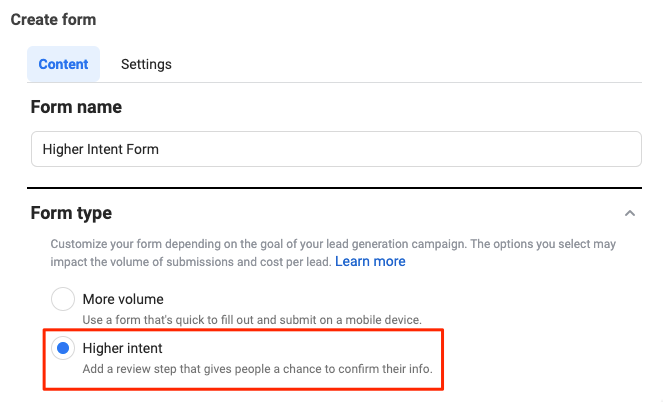
Meta offers different Instant Form types, including More volume, Higher intent, and Rich creative in supported campaign configurations.
The Higher intent option introduces a review step before submission. This gives users an additional opportunity to check their information and confirm that they want to proceed. Meta specifically positions the format as an alternative to the default More volume option when advertisers want greater submission intent. (Meta’s Instant Form type guide)
This review screen will not eliminate every poor lead. It is still valuable because it interrupts reflexive submission and asks the prospect to make one more deliberate decision.
Use Higher intent when:
- Each lead requires individual sales follow-up
- Your service has a substantial price
- Representatives spend significant time qualifying prospects
- Accidental submissions are common
- Appointment quality matters more than maximum volume
More volume may remain appropriate for low-commitment offers such as newsletter subscriptions or downloadable resources. It is less appropriate when every submission triggers an expensive sales process.
4. Add Active Confirmation Instead of Trusting Autofill Alone
Meta’s prefill questions can use information associated with a person’s account, including contact details. Users can review and edit that information before submitting. (Meta’s prefill-question guidance)
Prefill reduces typing, but old account data can produce inactive email addresses or outdated numbers. It also requires less conscious participation than entering or confirming information manually.
Do not duplicate every contact field unnecessarily. Add active confirmation where errors create the greatest operational cost.
Useful approaches include:
- Ask which telephone number should receive the sales call.
- Ask the prospect to select the best contact method.
- Ask whether WhatsApp is active on the submitted number.
- Ask the prospect to confirm when they can receive a call.
- Include a required acknowledgement that a representative will contact them.
Where available, Meta’s SMS verification feature sends a one-time password so the person can verify the submitted telephone number. This does not prove purchasing intent, but it can reduce invalid or incorrectly entered numbers. (Meta’s SMS verification instructions)
Verification answers one question: does the person control this number? Qualification questions must answer the more important question: should your sales team contact them?
5. Use Custom Questions to Screen for Commercial Fit
Meta allows advertisers to add custom questions to Instant Forms. Current documentation states that a form can contain up to 15 questions, although using the maximum would rarely create the best prospect experience. (Meta’s custom-question instructions)
Use three to five high-signal questions rather than a long interrogation.
Ask Questions That Change the Sales Decision
A useful question should help you decide whether to contact the lead, how urgently to contact them, or which sales route they should enter.
Strong B2B screening questions include:
What service are you interested in?
This confirms offer relevance and routes the lead to the correct representative.
What is your approximate project budget?
Use realistic ranges rather than demanding an exact figure.
When would you like to begin?
Options might include immediately, within 30 days, within three months, or researching for later.
How many employees or locations does your company have?
This can indicate operational complexity and account fit.
What is your role in this decision?
Possible answers include final decision-maker, part of the buying team, researcher, or service user.
Avoid Low-Signal Questions
Do not ask for information merely because the form builder allows it.
Questions such as “Would you like to grow your business?” provide little qualification value because almost everyone will answer positively. Questions should reveal constraints, needs, readiness, or fit.
You must also comply with Meta’s restrictions on prohibited questions and applicable privacy, advertising, and discrimination rules. Review Meta’s Instant Form question restrictions before collecting sensitive or regulated information.
6. Use Conditional Logic to Create Different Paths
Not every respondent should reach the same conclusion.
Meta supports conditional logic in Instant Forms, allowing subsequent questions or destinations to change according to a person’s previous answer. (Meta’s conditional-logic guidance)
For example, a business automation provider might ask:
How many employees use your current workflow?
A company selecting “50 or more” could receive questions about integrations and implementation timing. A person selecting “Just me” could be directed towards a self-service product page instead of an enterprise sales consultation.
Conditional paths can be used to:
- Route qualified buyers to appointment booking
- Send early-stage prospects to educational content
- Direct smaller customers to a lower-cost package
- Separate different service enquiries
- Stop unsuitable prospects from entering the main sales queue
The purpose is not to reject people disrespectfully. It is to give each prospect a next step appropriate to their situation.
7. Build an Explicit Confirmation and Follow-Up Path
Submission should not be the end of the customer journey.
Before the final button, tell prospects what they are agreeing to and what will happen next.
A clear confirmation statement could say:
By submitting this form, you confirm that you are requesting a consultation about our business automation service and that our team may contact you using the details provided.
After submission, use the completion screen to provide a specific next action. Meta recommends customizing this screen to encourage further engagement. (Meta’s lead-ad best practices)
Appropriate actions include:
- Book a consultation
- Visit a service page
- Download a preparation checklist
- Start a WhatsApp conversation
- Review pricing information
- Watch a product demonstration
A booking step creates additional commitment. Someone who chooses a date and time generally shows more intent than someone who submits contact information and disappears.
Do not send prospects to a generic homepage. The destination should continue the exact offer presented in the advertisement and form.
Connect Lead Quality Data Back to Meta
Form improvements alone cannot teach Meta which submissions become revenue.
Integrate your CRM so leads enter the sales workflow quickly and downstream outcomes can be recorded. Meta supports CRM integrations for retrieving and following up with leads generated across its technologies. (Meta’s CRM integration directory)
Track sales stages such as:
- New lead
- Invalid details
- Contacted
- Qualified
- Appointment booked
- Opportunity created
- Customer won
- Customer lost
Where eligible, use the Maximize number of conversion leads performance goal rather than optimizing only for form submissions. Meta states that this goal is intended to help deliver ads to people more likely to complete a later conversion.
For new campaign creation, Meta’s current guidance states that beginning in April 2026, the conversion-leads performance goal requires Conversions API integration. Confirm current eligibility and setup requirements inside your account before restructuring campaigns.
A Practical High-Intent Instant Form Structure
A streamlined B2B form could use this sequence:
Introduction: Identify the intended customer, service, minimum requirements, and consultation outcome.
Contact details: Collect name, business email, and verified telephone number.
Fit question: Ask about company type, size, or operational need.
Readiness question: Ask about implementation timing.
Commercial question: Ask for a realistic budget or service range.
Authority question: Confirm the respondent’s role in the decision.
Confirmation: Explain that a representative will contact qualified applicants.
Review: Use the Higher intent review step.
Completion: Send qualified prospects to appointment booking and other prospects to relevant educational material.
This structure adds purposeful friction without turning the form into a lengthy application.
Optimize for Sales Efficiency, Not Form Completion
The cheapest Instant Form is not automatically the most profitable form.
Your sales representatives should spend their time speaking with people who understand the offer, meet the basic requirements, and expect to be contacted. That requires alignment between the advertisement, qualification questions, confirmation process, CRM, and sales follow-up.
Review your current Instant Form beside your sales team’s rejection reasons. Remove questions that provide no decision value. Add the two or three missing questions that would prevent unsuitable submissions from reaching a representative. Then measure qualified-lead cost, appointment attendance, opportunity creation, and revenue—not cost per lead alone.
A smaller list of confirmed, properly routed prospects can create more growth than a large database of people who never intended to speak with you.


